Building tephra, day 1: from a design doc to a program in the kernel
contents
The question
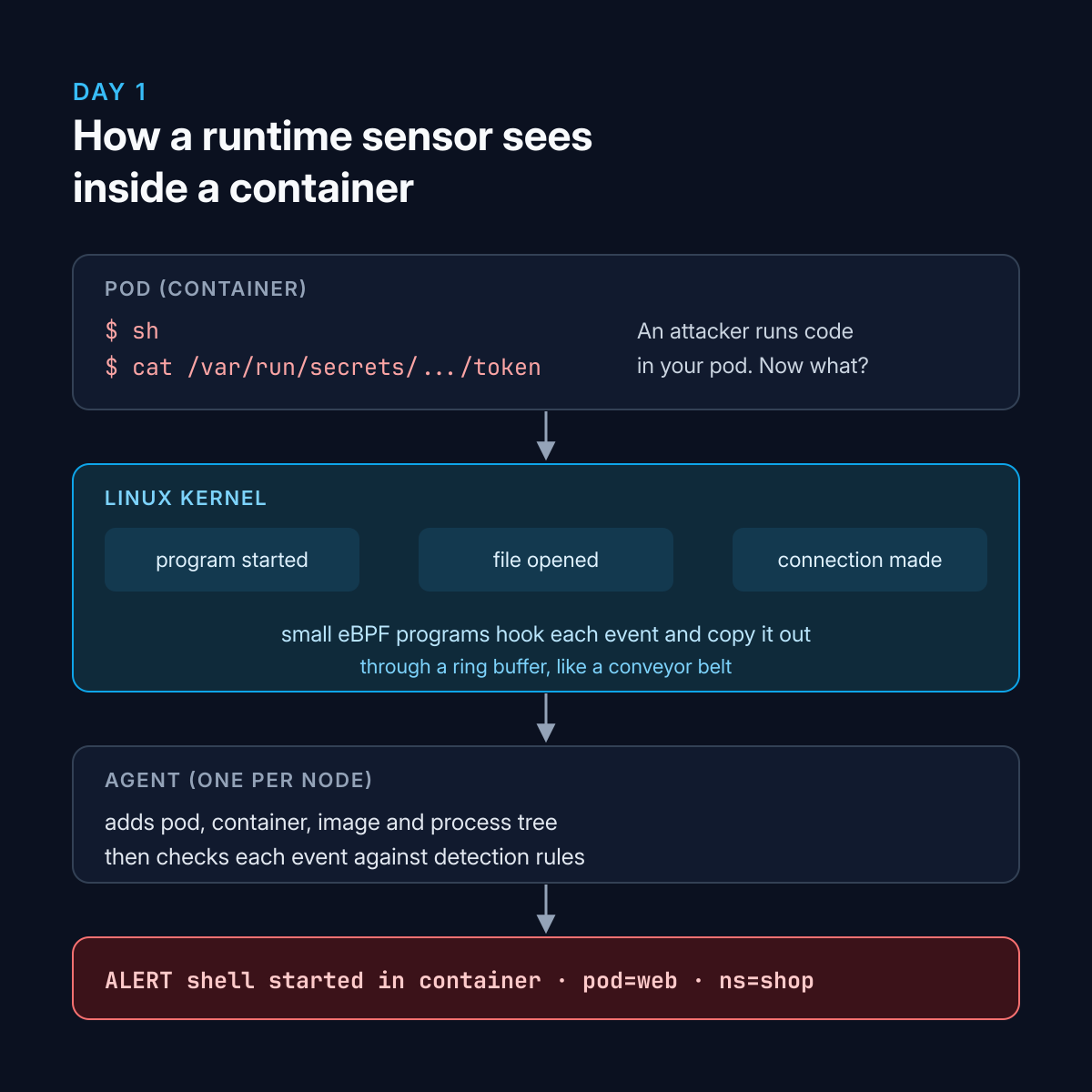
Say an attacker gets code running in one of your Kubernetes pods, through a vulnerable web app, a poisoned dependency, whatever. What do they do next? Usually something like: start a shell, read the pod’s service account token, look around the network, try to reach the node.
Would you see any of it? Logs from your app won’t show it. Kubernetes audit logs won’t either, because none of this goes through the Kubernetes API. It happens inside the container, as ordinary Linux processes doing ordinary Linux things. The only place that sees all of it is the kernel.
A runtime sensor watches from there: every program started, every file opened, every connection made, tagged with the pod it came from, and checked against detection rules.
Why build one when Falco and Tetragon exist
They exist, they’re good, and if you need runtime detection today you should use one of them.
I wanted to understand how this works from the kernel up, not just how to configure it. And the way to really understand a detection tool is to build one and then attack it. So tephra is a learning project with rules I’d want from any security tool:
- Prove coverage with real attacks. A harness that runs actual attack techniques against a cluster and records detected or missed, and the misses get published too.
- Measure what it costs. The same workloads with and without the sensor, numbers included even when they’re unflattering.
- Run on any kernel from 5.15 up without compiling on the node. No kernel headers, no compilers in production.
- Name the pod in every alert. An alert that says “a shell started somewhere on node 3” is close to useless. It has to say which pod, container, image, and which process started it.
Version 1 only detects. Blocking comes later.
What eBPF is, in plain words
eBPF lets you load small programs into a running Linux kernel and attach them to events: a program starting, a file opening, a socket connecting. No kernel module, no reboot.
Two things make it safe enough to run in production:
- The verifier. Before the kernel accepts a program, it checks every possible path through it: no unbounded loops, no reading memory it shouldn’t, guaranteed to finish. If the verifier isn’t convinced, the program doesn’t load.
- Limited reach. The program can only call a fixed set of kernel helpers and write into shared data structures called maps.
To get events out of the kernel, the programs write into a ring buffer. The easiest way I found to think about it: a conveyor belt from the kernel to a normal program (the agent) running on the node. The kernel side puts events on, the agent takes them off. If the agent falls behind and the belt fills up, events fall off the end. Those are drops, and counting them honestly matters later.
What day 1 actually produced
Nothing clever yet, just the foundation:
- The design document first. Goals, non-goals, a threat model (who the attacker is, what they can and can’t do), the milestones and what proves each one done. Writing down “this is how I’ll know it works” before writing code turned out to matter a lot later.
- A dev environment. A virtual machine with a local three-node Kubernetes cluster (kind): one control plane and two workers.
- One eBPF program. It hooks the kernel’s
sched_process_exectracepoint, which fires every time a program starts, and for now it only counts. That’s deliberately tiny: the point was proving the whole path works, from compiling the program to loading it, attaching it and reading its counter. - The agent. A small Go program that runs on every node (a Kubernetes DaemonSet). On start it probes what the kernel supports, loads the program, attaches it, and logs the exec counter every 10 seconds.
The day-1 test was simple: on a fresh VM, one command builds everything, and all three agent
pods log program attached. It passed.
Next
Day 2 turns that counter into real events: which program started, with what arguments, by which user, and the hard part, which pod it belongs to.